Why a Cheaper GPU Can Make Your Tokens More Expensive
GPUs are compared by price per hour, but you pay for tokens. Here is the math behind cost per token, worked through one model and one cluster: two levers that cut it, and the case where moving to a cheaper GPU makes every token cost more.
GPUs get compared by their price per hour. An H100 costs more than an A100, which costs more than an L4, so the cheaper card must be the cheaper choice.
But you don't buy GPU-hours. You buy tokens. And once you do the math in tokens, the cheapest GPU per hour is sometimes the most expensive way to serve your model.
This post walks through that math on one model and one cluster, with real-looking numbers at every step. It's a companion to Model FLOPs Utilization: What Your GPUs Are Really Doing, which explains the efficiency metric this all rests on.
---
The formula
Cost per token is just what you pay divided by what you get:
cost per token = cost per hour / tokens per hourThat's all you need to compare two setups. To see what you can change, it helps to look at the same number another way:
cost per token = perfect cost per token / MFU- Perfect cost per token is what a token would cost if the GPU spent every moment doing nothing but your model's math. It's the floor: you can never pay less on that GPU. It's set by which GPU you choose (its price and how much math it can do) and by the model (how much math a token needs, about 2 x the parameter count).
- MFU (Model FLOPs Utilization) is the share of the GPU's math that actually went into your model. It's set by how well you use what you have.
Think of a delivery van that costs $100 a day and carries 1,000 parcels. Run it full and each parcel costs 10 cents: that's the perfect cost. Run it 5% full and you carry 50 parcels for the same $100, so each costs $2, which is 10 cents / 0.05. MFU is how full the van is.
So there are exactly two levers. Fill the van (raise MFU), or buy a van with a lower perfect cost (choose a different GPU). Everything below is one or the other.
---
The setup
One model, serving production traffic:
| Value | |
|---|---|
| Model | 8 billion parameters, 16-bit weights |
| Compute per token | 2 x 8 billion = 16 billion FLOPs |
| Traffic | 2,400 tokens per second on average, peaking at 3,600 |
| H100 | about 1,000 trillion FLOPs per second; example price $3.50 per hour |
| A100 40GB | about 312 trillion FLOPs per second; example price $2.21 per hour |
For capacity, assume that at this model's latency target an H100 can serve about 3,000 tokens per second and an A100 40GB about 1,000. Prices vary by provider and contract; these are examples, and the figures throughout are rounded.
---
Before: 8 GPUs doing 3 GPUs' work
The model runs on 8 H100 replicas. After a launch-day spike the autoscaler scaled out and never scaled back in, because it was configured to scale on CPU, which barely moves for GPU serving.
| Value | |
|---|---|
| Tokens per second per GPU | 2,400 / 8 = 300 |
| MFU per GPU | (300 x 16 billion) / 1,000 trillion = 0.48% |
| Cost per hour | 8 x $3.50 = $28.00 |
| Tokens per hour | 2,400 x 3,600 = 8.64 million |
| Cost per million tokens | $28.00 / 8.64 = $3.24 |
A utilization dashboard would likely show these GPUs as reasonably busy, because something is running on each of them most of the time. MFU shows how little of each GPU the model actually uses.
The same answer through the van: an H100 does about 3.6 quintillion FLOPs in an hour for $3.50, and a token needs 16 billion of them, so a perfectly used H100 would produce a million tokens for about 1.6 cents. At 0.48% MFU you pay 1.6 cents / 0.0048 = $3.24.
---
Lever 1: use the GPUs you pay for
The evidence: autoscaling is on and running 8 replicas against a floor of 2, the request queue has been empty for a week, and latency is well inside its target. Three replicas would carry even the peak, at 3,600 / 3 = 1,200 tokens per second each, well within an H100's 3,000.
| Before | After scaling in | |
|---|---|---|
| Replicas | 8 x H100 | 3 x H100 |
| Tokens per second per GPU | 300 | 800 |
| MFU per GPU | 0.48% | 1.28% |
| Cost per hour | $28.00 | $10.50 |
| Cost per million tokens | $3.24 | $1.22 |
| Monthly cost (730 hours) | $20,440 | $7,665 |
MFU went up 2.7 times and cost per token went down 2.7 times. That isn't a coincidence: the GPU didn't change, so the perfect cost didn't either, and only the share you use moved. The van is fuller. Same traffic, $12,775 a month less.
---
Lever 2: pay less for compute
The model's weights take about 16 GB, which fits an A100 40GB with room to spare. At the peak of 3,600 tokens per second, 4 A100s carry 900 each, under their 1,000 limit.
| After scaling in | After changing GPU | |
|---|---|---|
| Replicas | 3 x H100 | 4 x A100 40GB |
| Tokens per second per GPU | 800 | 600 |
| MFU per GPU | 1.28% | 3.1% |
| Cost per hour | $10.50 | $8.84 |
| Cost per million tokens | $1.22 | $1.02 |
| Monthly cost | $7,665 | $6,453 |
Cheaper again, but look at why. The A100 is cheaper per hour, but it does so much less math that its perfect cost per token is about twice the H100's: about 3.1 cents per million tokens against 1.6. It still wins here only because MFU rose 2.4 times, from a van that was running nearly empty. The net is only about 16% cheaper per token.
There is also a cost outside the table. Each A100 generates tokens more slowly, so every user waits longer for each word. That's only acceptable if the latency target still holds, which is why a change like this needs a person to approve it.
---
The trap: when the cheaper GPU costs more
Lever 2 worked because the H100s were underused. Change one thing, the traffic, and the same move backfires.
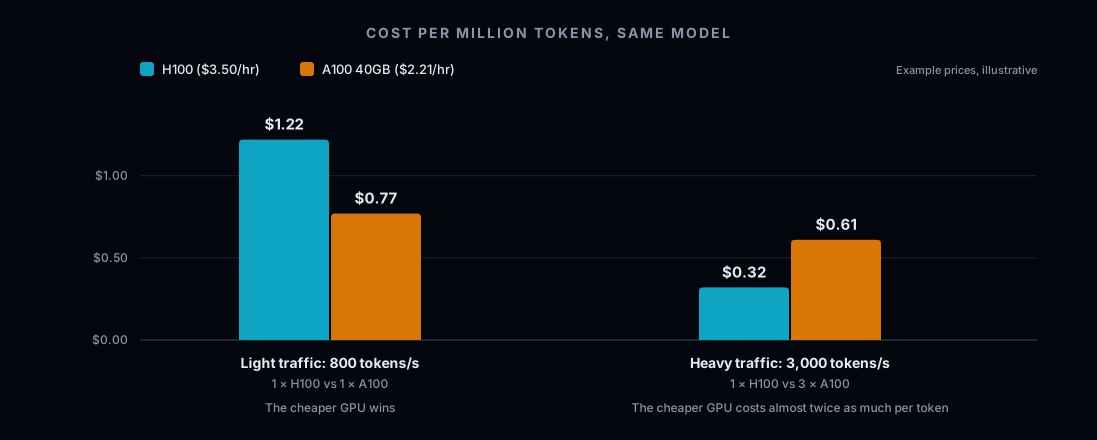
| Traffic | On H100 | On A100 40GB | Cheaper per token |
|---|---|---|---|
| 800 tokens/s | 1 GPU, $3.50/hr, $1.22 per million | 1 GPU, $2.21/hr, $0.77 per million | A100 |
| 3,000 tokens/s | 1 GPU, $3.50/hr, $0.32 per million | 3 GPUs, $6.63/hr, $0.61 per million | H100 |
At light traffic the H100 is mostly idle: you're paying for compute you don't use, and the smaller card wins. At heavy traffic the H100 is busy, and its perfect cost per token is half the A100's. Replacing it takes three A100s, and every token costs almost twice as much.
The rule that falls out of this is simple. In this example an A100 costs 63% of an H100 per hour, so switching saves money only if you need fewer than about 1.6 A100s for every H100 you replace. Light traffic: 1 for 1, or 4 for 3, and you save. Heavy traffic: 3 for 1, and you lose.
---
End to end
| Start | After both changes | |
|---|---|---|
| GPUs | 8 x H100 | 4 x A100 40GB |
| MFU per GPU | 0.48% | 3.1% |
| Cost per million tokens | $3.24 | $1.02 |
| Monthly cost | $20,440 | $6,453 |
That's about 68% less for the same traffic, and most of it came from Lever 1. Using the GPUs you already pay for is the bigger, safer win; changing GPUs is a smaller one that only works under the right conditions. And as the next section shows, it isn't even the cheapest fleet available here.
---
Order matters: scale in first, then consider the GPU
Whether a cheaper GPU pays off depends on how busy the current GPUs are, and you only know that once the number of GPUs is right. Same traffic as before, 2,400 tokens per second on average and 3,600 at peak:
| Option | Peak load per GPU | Cost per hour | Cost per million tokens |
|---|---|---|---|
| 8 x H100 (the start) | 450 tokens/s | $28.00 | $3.24 |
| 4 x A100 40GB, changing GPU first | 900 tokens/s | $8.84 | $1.02 |
| 3 x H100, scaled in with headroom | 1,200 tokens/s | $10.50 | $1.22 |
| 2 x H100, scaled in fully | 1,800 tokens/s | $7.00 | $0.81 |
From the starting point, switching to A100s looks like a huge saving: $28.00 down to $8.84 an hour. But scale in first, and 2 H100s carry the peak at 60% of their capacity for less than the A100 fleet costs. At that point they're busy enough that the switch would lose money: replacing 2 H100s takes 4 A100s, $8.84 against $7.00. Deciding the GPU first would have locked in a more expensive fleet that looked like a saving.
Above, we kept 3 H100s to leave headroom, and from there the A100 switch still saved a little. Either way, the right GPU depends on the right count. Scale in, measure, then decide on the GPU.
There's a second reason for the order. Scaling in is a configuration change: it slows nothing down and can be reversed in minutes if traffic comes back. Changing GPU type means moving workloads, checking the model fits, and accepting slower generation. Make the safe, reversible change first.
---
What to take from this
- Compare GPUs per token, not per hour. The hourly price is half the number.
- Scale in before you change GPU type. Which GPU is cheapest depends on how busy it will be, and that depends on how many you run.
- Low MFU in inference is normal. Even at the end it's 3.1%, because generating tokens is limited by memory speed. The problem at the start wasn't the number; it was 8 GPUs doing 3 GPUs' work.
- MFU explains the cost; cost per token is what you manage. Lever 2 shows MFU can rise while compute gets more expensive.
- A smaller GPU is right only when the current one is underused and the model fits. Otherwise it's the trap.
---
Where Paralleliq fits
Doing this math once, for one model, is easy. Doing it continuously for every model in a fleet, while traffic, models and prices change, is the hard part. That's what Paralleliq does.
It reads the telemetry and configuration your cluster already produces and recommends a specific change on each lever: scaling a deployment in when its replicas sit above their floor through a quiet week, and moving a model to a cheaper GPU only when the model fits there and the current GPU is underused. It also won't recommend a GPU change while scaling in is still available: the GPU question only comes up once a deployment is at its replica floor, or isn't autoscaled at all. Each recommendation shows the evidence behind it and the estimated saving. Nothing is applied until an operator approves it, and every decision is recorded.
Want to see where your own cluster sits on both levers? piqc is our free, open-source scanner: point it at a Kubernetes cluster and it shows what's deployed, on what hardware, and where capacity is being left on the table, read-only and with no signup. Or request a demo to see how Paralleliq turns that into approved, audited changes.